
Creating Sequence Plans
A Sequence Plan bridges narrative intent and production. It breaks an Act into scenes and shots while retaining the characters, locations, devices, visual references, and story purpose that make the sequence coherent.
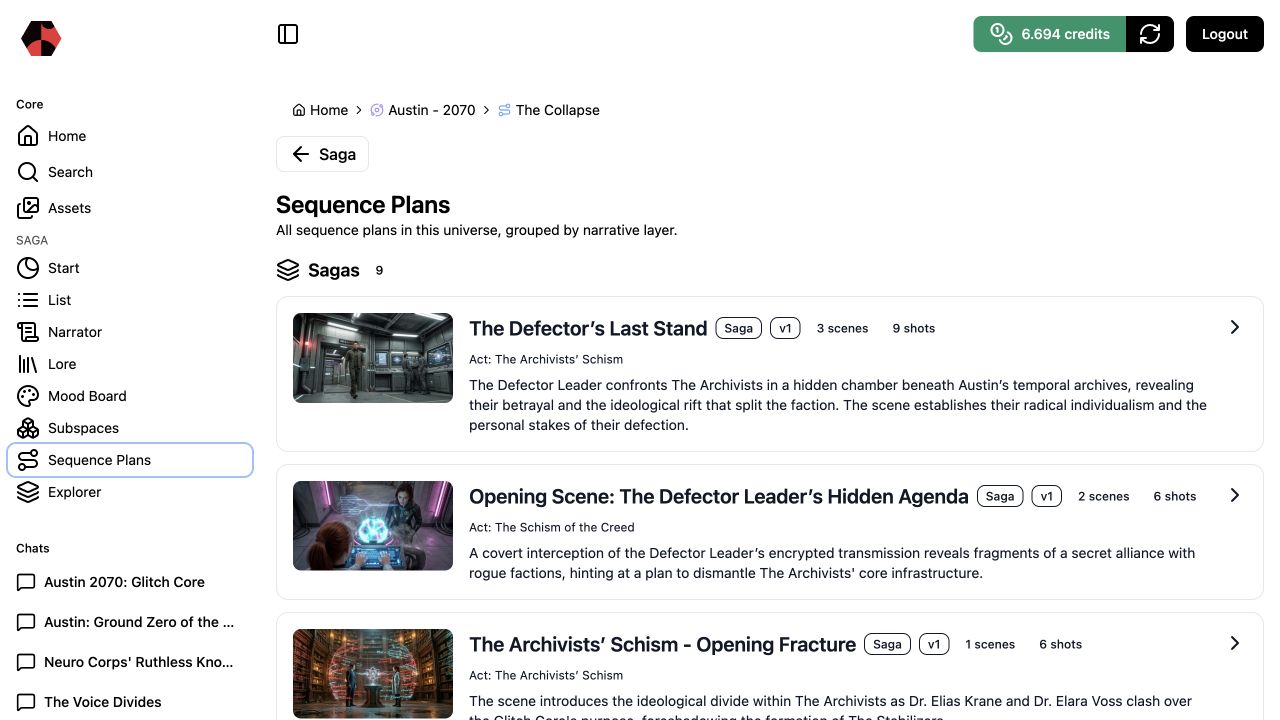
1. Start from an Act
Create or open an Act Subspace based on a meaningful Event or Chapter. Confirm the dramatic purpose before planning shots: what changes, who drives the change, and what the audience must understand.
2. Review the plan overview
The Sequence Plans list shows each plan with its narrative layer, version, scene count, shot count, connected Act, summary, and preview image. This makes it possible to compare versions without opening every sequence.
3. Inspect scenes before individual shots
First check whether the sequence has the right dramatic progression. Then review shot-level choices such as framing, camera movement, angle, location, participating characters, and the purpose of the shot.
4. Choose 9:16 for a social-first sequence
When a sequence is designed for vertical social video, select the 9:16 aspect ratio in the Sequence Plan. Plan the composition for the vertical frame: keep the essential subject and action readable, allow room for captions or platform interface elements when they matter, and use the tighter frame deliberately.
The format does not replace the story brief. A 9:16 plan still needs a clear audience takeaway, connected characters and locations, and a visual progression that serves the scene.
5. Resolve missing context upstream
If a shot has no clear location, character reference, device, or visual direction, return to Lore or the relevant Subspace. Filling the gap upstream keeps later renders consistent and reusable.
6. Export when the plan is stable
Generate production media only after the sequence reads clearly as a whole. Completed packages appear as ZIP assets and can be handed to editing or another production workflow.
Next step
Use Managing Assets to review generated video and ZIP outputs. Use the Explorer when a sequence exposes an unclear relationship in the story world.
Ready to start?
Build the next part of your world in Saganode.