
Using Search
Search gives you one place to find connected knowledge and media in the current universe. Instead of searching separate folders, you can trace a subject across Lore, focused Subspaces, and generated images.
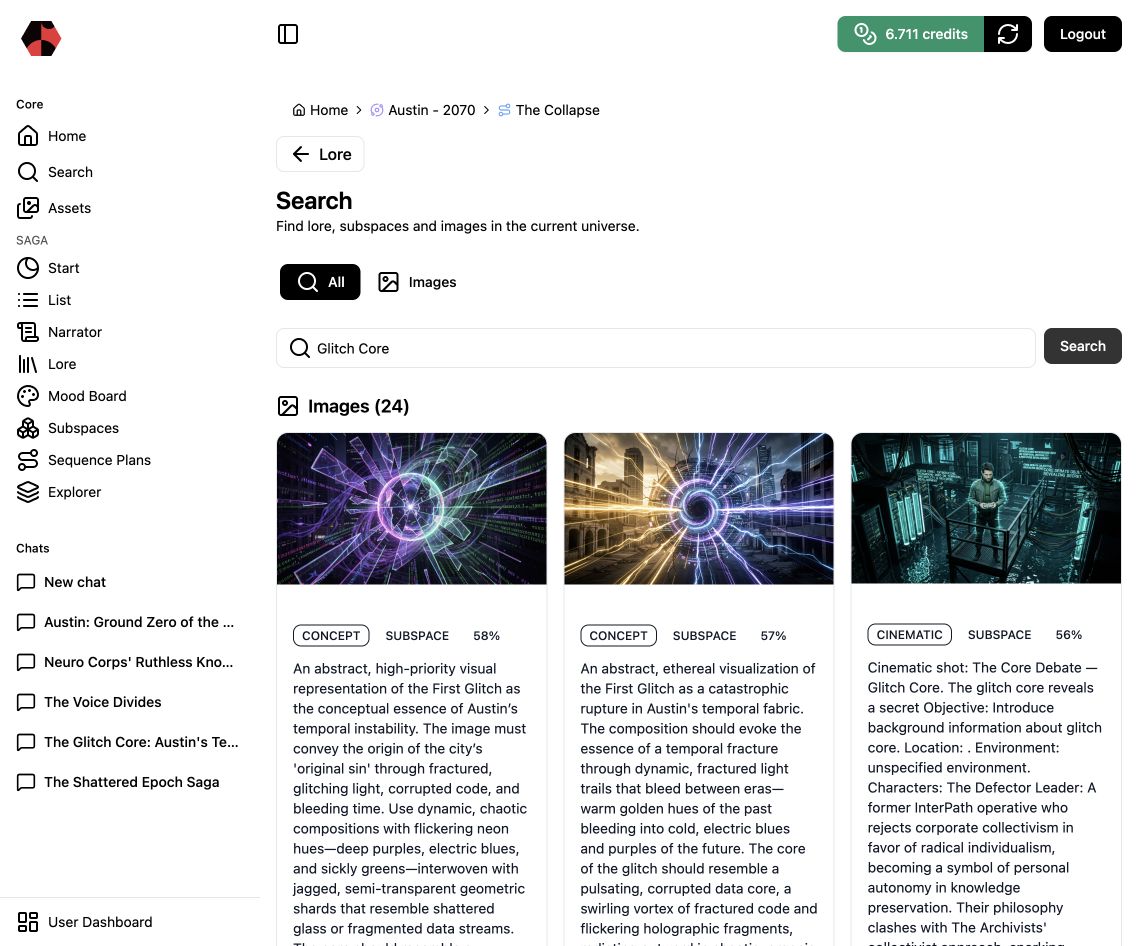
1. Search for a narrative subject
Use a specific name or concept. For example, searching for Glitch Core in Austin – 2070 → The Collapse returns visual interpretations, Lore elements, and Subspaces connected to that subject.
2. Read results by layer
Search results are grouped by content type:
- Images reveal how the subject has been visualized and how strongly each result matches.
- Lore shows the structured people, objects, locations, events, concepts, or chapters carrying the term.
- Subspaces shows where the subject is being developed for production.
This layered result is useful for finding duplication and drift. If a concept appears under several names or conflicting descriptions, review the relevant Lore element before generating more assets.
3. Narrow to images when needed
Choose Images when you are looking for a visual reference or an existing production asset. Stay in All when the goal is understanding: it preserves the connection between a visual result and the story knowledge behind it.
4. Continue from the strongest result
Open Lore to correct or expand canon, a Subspace to develop the selected element, or the Mood Board to curate its visual direction. Search is the navigation bridge; the connected workspace is where the next decision is made.
Next step
Read Using Lore to review structured knowledge or Working with Subspaces to develop a focused result.
Ready to start?
Build the next part of your world in Saganode.